TOO MANY MODES
Three ways to clean up MODE SELECT. Each one grows out of the screen you picked (the left rail, big cards, select then START), so it still feels like the same game. Every phone below is live: tap through it, or press PLAY THE FLOW. Each approach has a merge map that shows where all 17 of today’s cards go, so nothing a player needs gets lost. Pick one approach and one naming set, then press COPY MY PICKS.
17 CARDS, 9 TABS, 4 SHORTCUTS
The real MODE SELECT from the tested build. Each rail has three tabs and six cards, and the top right repeats three of them as shortcuts. Several cards start exactly the same match (checked in FrontModes.cs).
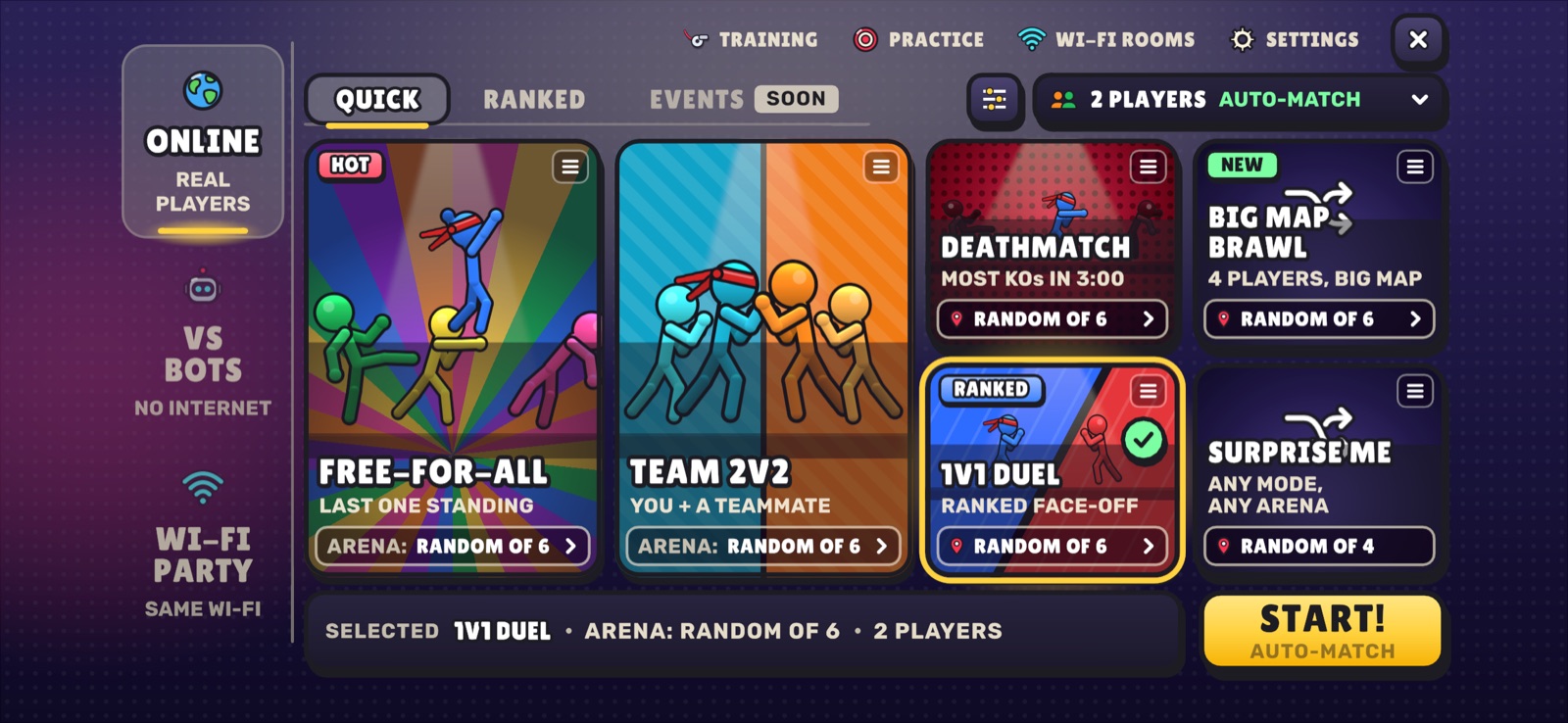 REAL CAPTURE · ONLINE
1
2
3
4
THINGS TO READ3 rails + 9 tabs + 4 shortcuts + 17 cards, before a new player plays a single match.
WHAT MUST STAY ONE TAP AWAY
Whatever we cut, these nine things stay easy to reach. Every approach below shows where each one lives, with a tick.
DECIDED: BIG MAP IS NOT A MODEEvery match picks a map that fits the player count, at random, never twice in a row. So the three BIG MAP cards can go: with 5 or more fighters, the big maps simply come up.
THREE WAYS TO CLEAN IT UP
A minimal one, a multi-step one, and a playlist one. Each phone is true to iPhone 16 landscape and fully tappable: switch rails, select a card, open SETUP, press START!.
THE BIG FOUR
RECOMMENDEDThe screen you picked, minus the clutter. No tabs. Each rail shows at most four big cards. Look-alike cards fold into the one they copy: bot count, level and “win by” live in SETUP, and team, co-op and deathmatch rooms become the Wi-Fi room’s MODE.
WHO, HOW, GO
Two questions, four words. Step 1 asks who you play with (the rail as three big doors). Step 2 shows the same four cards behind every door: 1V1, FREE-FOR-ALL, TEAMS, MOST KOs. Learn them once and they work online, vs bots and on Wi-Fi. Practice, training, joining and codes sit in a small strip under them. Step 3 sets the details and starts. AGAIN on step 1 replays your last match.
PLAYLISTS
Pick a vibe, and the game picks the mode. Three playlists per rail. QUICK MIX rotates free-for-all, teams, most KOs and big maps, and matching shows NEXT UP. Bots get a mix plus one CUSTOM card. On Wi-Fi, the host starts a PARTY MIX and friends vote the next mode between rounds.
CLEAR NAMES
Three naming sets. Tap one to rename every phone on this page live, then pick. Each card also keeps one plain line under its name that says what happens.
PLAIN
RECOMMENDEDSays exactly what happens. The team’s complaint was unclear names, so the plainest words win.
SHORT
One punchy word per card. Bigger letters, faster to scan, a little less obvious on day one.
STICKBASH
House flavour built on the game’s name. Fun and on-brand, but players must learn them.
SIDE BY SIDE
| TODAY | A · THE BIG FOUR | B · WHO, HOW, GO | C · PLAYLISTS | |
|---|---|---|---|---|
| FIRST SCREEN SHOWS | 3 rails, 3 tabs, 4 shortcuts, 6 cards | 3 rails, 4 big cards, 1 SETUP chip | 1 question, 3 doors | 3 rails, 3 playlists |
| CARDS IN TOTAL | 17 | 10 | 4 words + 1-2 extras per door | 9 |
| TAPS: ONLINE BRAWL | 2 | 2, or 1 when still selected | 3, or 1 with AGAIN | 2, but the mode is a surprise |
| TAPS: MOST KOs VS 5 HARD BOTS | 7 | 7 | 5 | 8 (CUSTOM) |
| TAPS: HOST TEAMS ON WI-FI | 3 | 5 (or change MODE in the room) | 3 | 5 |
| FIRST-TIME PLAYER | Lost | Clear: four plain cards | Clearest: two questions, four words | Easy, but never learns the mode names |
| REGULAR PLAYER | Fast, once learnt | Fast: last pick stays selected | Slower without AGAIN | Can’t choose the online mode (unless LOCK) |
| NEW MODES (PAGE 37) | EVENTS says SOON | THIS WEEK card + the room’s MODE list | The THIS WEEK strip on ONLINE’s step 2 | They join the mixes |
| LOOKS LIKE THE PICKED SCREEN | It is the picked screen | Yes: same rail, cards and START bar | New step screens, same cards and START | Yes, with playlist cards |
| BUILD | — | Small: fewer cards, no tabs, a SETUP sheet over the existing room presets | Medium: three step screens; every door runs the same 4 presets | Medium: playlist rotation + NEXT UP; a Wi-Fi mode vote (RoomVote already votes arenas) |