SSTICKBASH · FEEDBACK 20 OCT · PICKING A MODE
Page 31 · how you pick a fight

ONE QUESTION,
THEN FIGHT.

You said picking a game mode is confusing. Below: what’s confusing today, shown on real frames from the game, then four different ways to pick a fight. Every way is drawn as finished phone screens in the game’s own look, with the taps marked, so you can compare them side by side.

Every method keeps what you already have: the same 11 ways to play, the DARK VIVID fights, Wi-Fi parties, ranked online. Only how you get to them changes. Tap any phone to see it full size.

YOU SAID“The Gamemode selections so confusing, we need some alternate methods for that.”
00

WHAT’S CONFUSING TODAY

Real stills from the build on your Mac (Home with a friend’s party nearby, and ALL MODES’ three tabs). The red marks are the six things that make it hard to read.
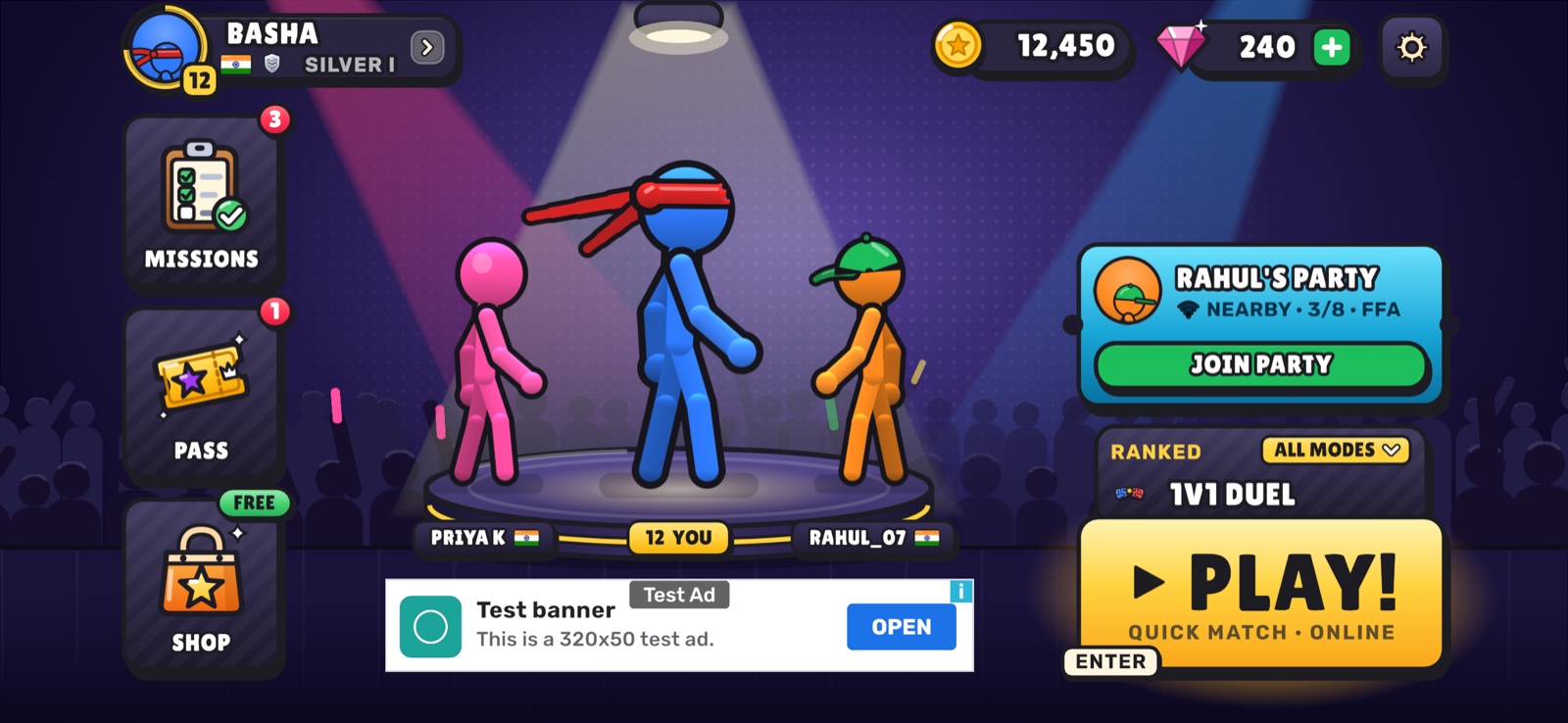
Home today 1 1 2
HOMEThree things to tap on the right. The selector says RANKED 1V1 DUEL, but PLAY! says QUICK MATCH · ONLINE.
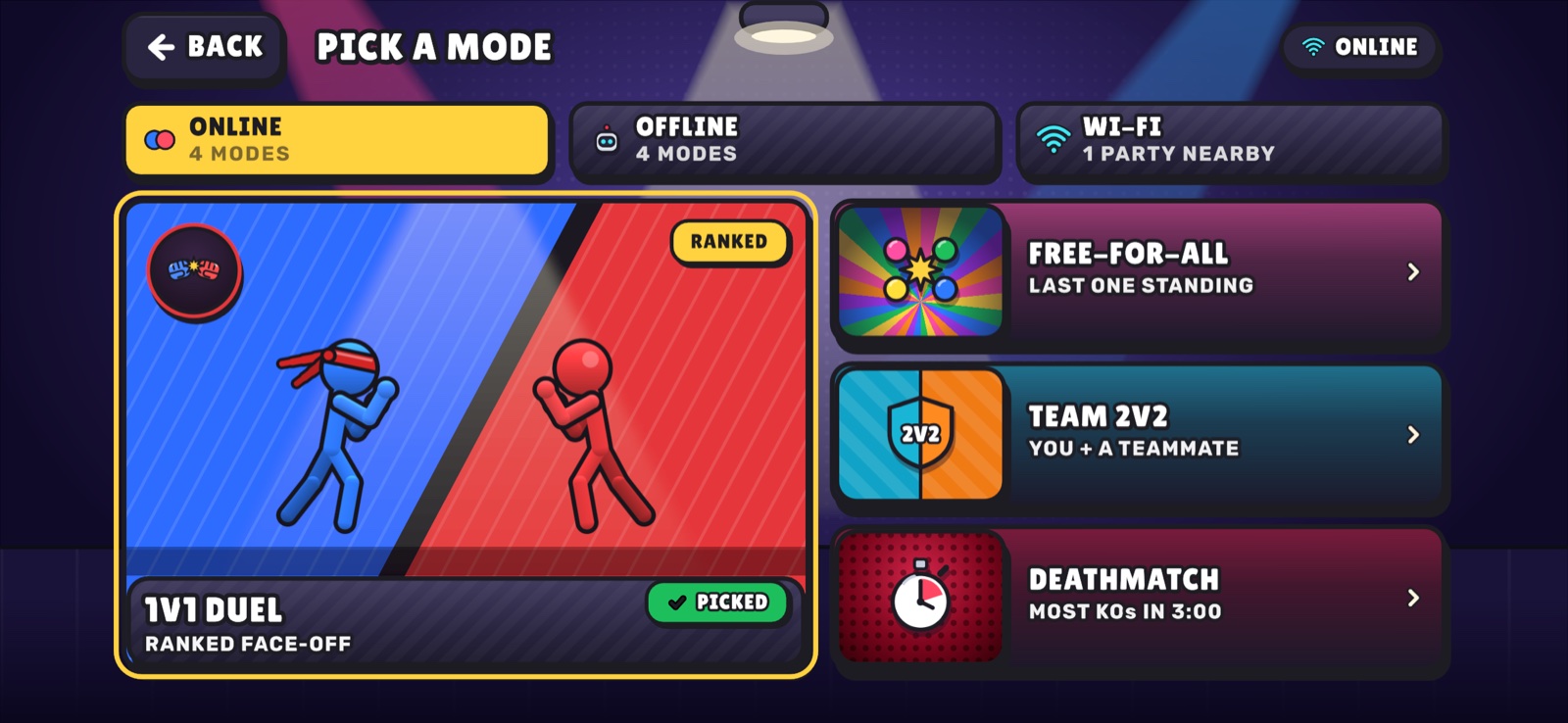
ALL MODES, ONLINE tab 3 4
ALL MODES · ONLINETabs split by connection type. Tapping a mode only marks it PICKED; it doesn’t start it.
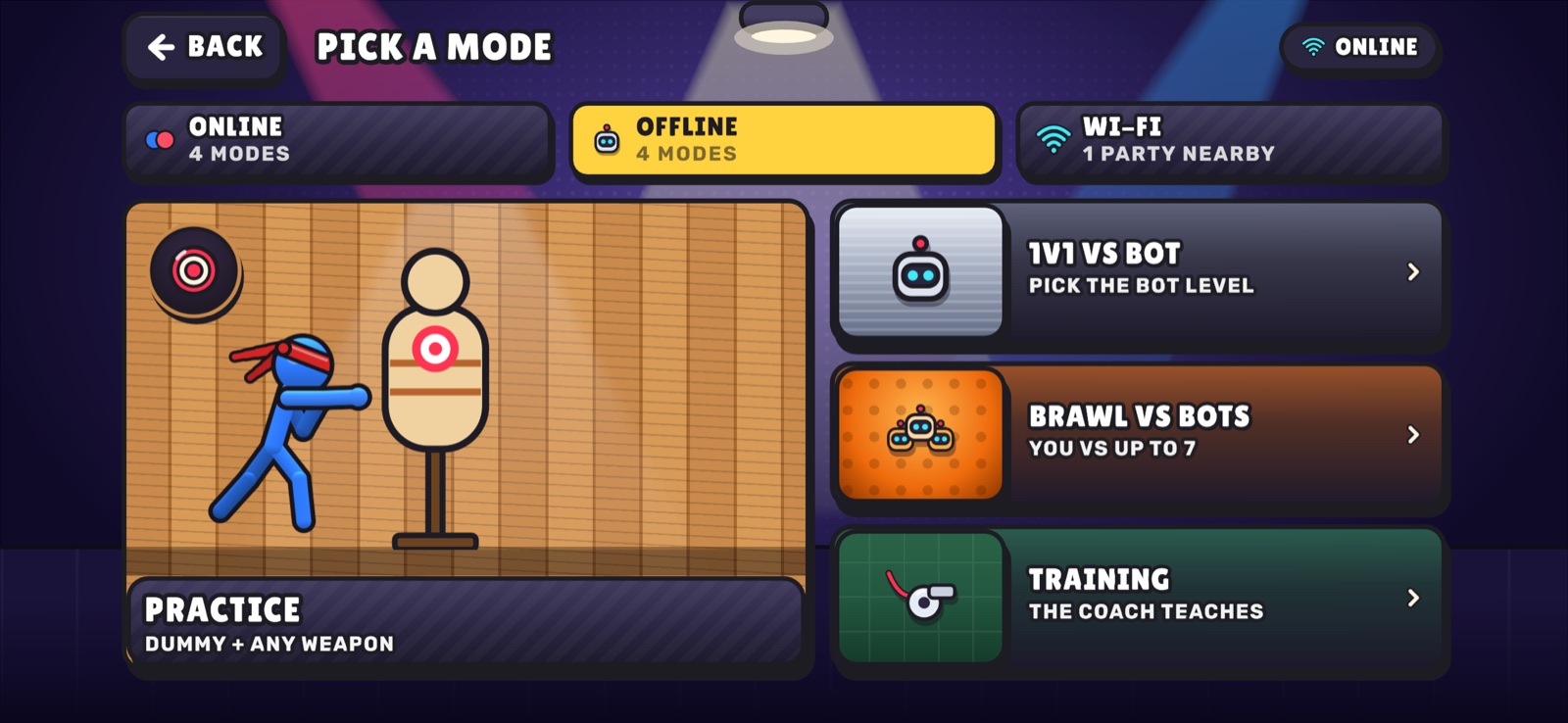
ALL MODES, OFFLINE tab 5
ALL MODES · OFFLINEBots are under “offline”. 1V1 VS BOT next to 1V1 DUEL; BRAWL VS BOTS next to FREE-FOR-ALL and DEATHMATCH. What’s the difference?
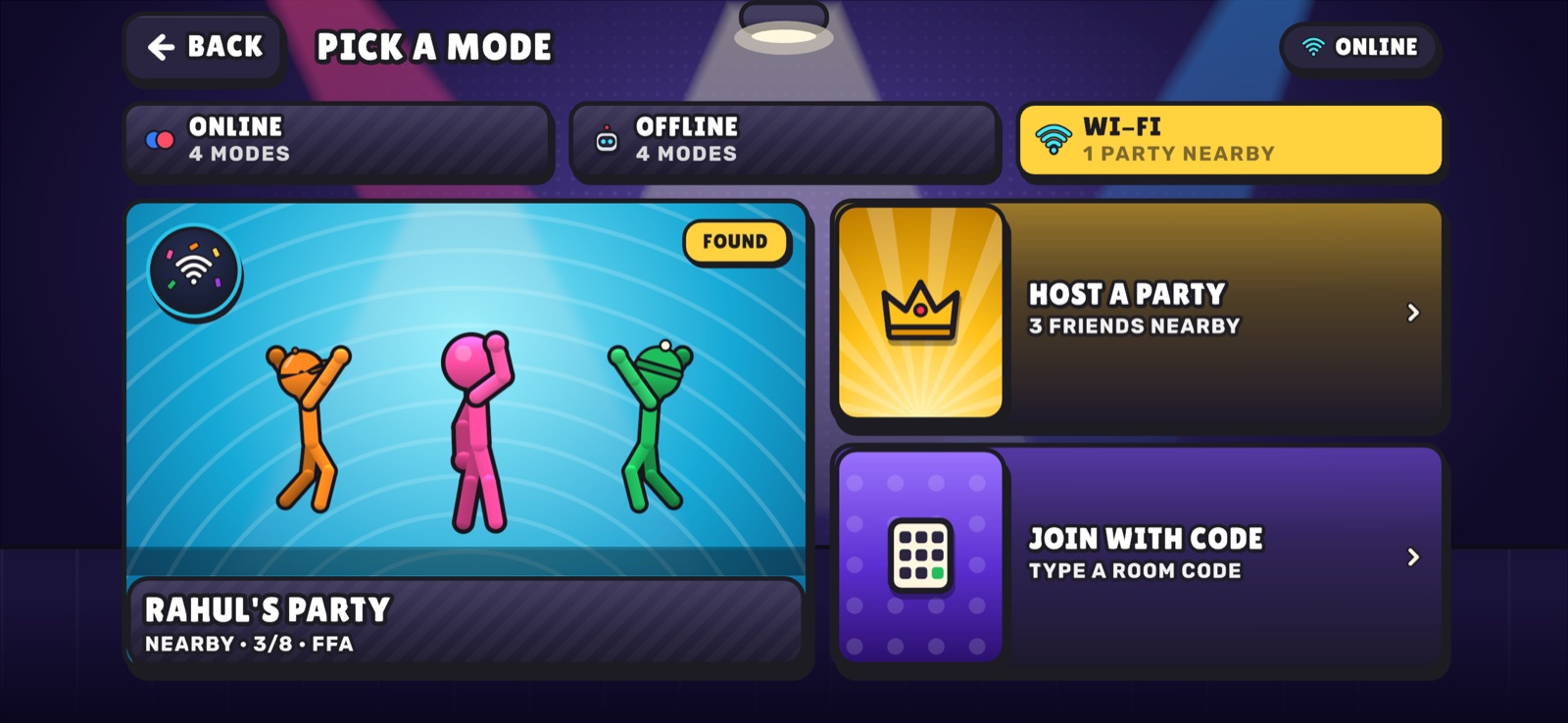
ALL MODES, WI-FI tab 6
ALL MODES · WI-FIFriends show up in three places (Home ticket, this tab, the Wi-Fi hub), and FRIENDS VS BOTS is hidden inside a room’s rules.
1THREE DOORS ON HOMEThe party ticket, the mode selector and PLAY! all start different things. A new player can’t tell which one is “play”.
2PLAY! DISAGREESPLAY! says QUICK MATCH · ONLINE while the selector shows RANKED · 1V1 DUEL. You can’t trust what the big button will do.
3SORTED BY CONNECTIONONLINE / OFFLINE / WI-FI are how the game connects, not what you want. People think “bots”, “my friends” or “real players”.
4TAP DOESN’T PLAYA tile tap makes it PICKED. Then you tap it again, or go back to Home and press PLAY!. Wi-Fi tiles do start at once, which is a different rule on the same screen.
5NAMES THAT OVERLAPDUEL vs 1V1 VS BOT, FREE-FOR-ALL vs BRAWL VS BOTS vs DEATHMATCH. The names describe rules, not who you fight.
6FRIENDS IN THREE PLACESJoin a party from Home, the WI-FI tab or the hub; HOST A PARTY here vs HOST A ROOM there; co-op buried in room rules.
TODAY: FIGHT 3 BOTS 1ALL MODES›2OFFLINE TAB›3BRAWL VS BOTS›4TAP IT AGAIN›5START 5 TAPS
A

WHO’S YOUR FIGHT?

RECOMMENDED

Home asks one question with three big doors: BOTS, FRIENDS, ONLINE. Each door is a short list in plain words (“you vs 3 bots”, “you + friends vs bots”). PLAY! always repeats what you played last.

1HOMEOne question, three doors. PLAY! says exactly what it repeats.
2BOTS DOORQUICK BRAWL starts with your last settings (tap a chip to change). Practice and Training live here too.
2FRIENDS DOORThe party nearby is the big card. Host, co-op and the code are one list.
2ONLINE DOORRanked 1V1 up top; casual brawls below, each saying how many players.
SIGNATURE DETAILThe first question is who you fight, not how the game connects. The FRIENDS door glows with a live count when a party is nearby.
TAPS TO A MATCH
2vs bots2join friends2online1play again
FRIENDS ON WI-FIA top-level door. A party nearby makes it glow with 2 NEARBY; JOIN! is the big card inside. One place for host, join, code and co-op.
PRACTICE + TRAININGInside the BOTS door, under the fights. First-timers get TRAINING as their PLAY! until they finish part 1.
NO INTERNETThe ONLINE door greys out with NO SIGNAL; BOTS and FRIENDS keep working, which says why at a glance.
WHAT CHANGES IN THE GAMEHome’s right column and the ALL MODES screen become the three doors; the 11 modes and their art stay.
B

SWIPE + PLAY

One row of big illustrated cards above PLAY!. Swipe to the one you want; PLAY! plays the card in the middle. A nearby party jumps to the front by itself. Everything else lives behind one ALL WAYS TO PLAY list.

1HOMEThe middle card is what PLAY! plays. Swipe for the next one.
2FRIENDS NEARBYA found party slides to the middle; PLAY! becomes JOIN.
+ALL WAYS TO PLAYThe last card opens the full list, grouped by who you fight.
SIGNATURE DETAILThe fastest for returning players: your mode is already in the middle, so it’s one tap. Six cards max, so it never becomes a long scroll.
TAPS TO A MATCH
1same as last time2swipe + play1party nearby3anything in MORE
FRIENDS ON WI-FIA found party takes the middle card automatically; hosting is a card in the row.
PRACTICE + TRAININGCards at the end of the row, plus the full list.
FIRST-TIME PLAYERSWeaker: a swipe row hides choices. The first card would be TRAINING until part 1 is done.
WHAT CHANGES IN THE GAMEHome’s ticket + selector become the card row; ALL MODES becomes the grouped list.
C

PLAYLISTS

Like a console party game: PLAY! opens six big posters, each a ready-made match with a plain name: QUICK BRAWL, PARTY ON WI-FI, 1V1 RANKED, CO-OP VS BOTS, ONLINE BRAWL, PRACTICE ROOM. One tap plays; a small RULES chip tweaks it.

1HOMEJust PLAY!. Home becomes calm: your fighter, the rail, one button.
2PLAYLISTSSix posters. Each says where it plays (OFFLINE / WI-FI / ONLINE) and starts on one tap.
+RULES (OPTIONAL)The chip opens three choices right on the poster; START plays it.
SIGNATURE DETAILEvery poster is a whole match, ready to go. Rules are tucked into a chip, so most people never see a settings screen.
TAPS TO A MATCH
2vs bots2join friends2online3with rules
FRIENDS ON WI-FIPARTY ON WI-FI and CO-OP VS BOTS are posters; a party nearby shows 2 NEARBY on its poster.
PRACTICE + TRAININGPRACTICE ROOM is a poster; TRAINING sits in Settings > LEARN and runs first for new players.
FIRST-TIME PLAYERSVery clear: six pictures, plain names, one tap. Home itself gets simpler.
WHAT CHANGES IN THE GAMEHome loses the ticket and selector; ALL MODES becomes the poster wall.
D

STAGE FIRST

Pick where you fight on a spotlit strip of real arenas, then two simple toggles: WHO (bots / friends / online) and MODE. START does the rest. The most visual, but it asks three things.

1PICK A STAGEReal arenas, the middle one spotlit. WHO and MODE below.
2WITH FRIENDSWHO = FRIENDS turns START into HOST!, opening a Wi-Fi room on that stage.
3ROOM OPENFriends on the same Wi-Fi see the room and join.
SIGNATURE DETAILThe arenas sell the game: real DARK VIVID frames as big picture cards. Joining a friend’s party still needs its own path, though.
TAPS TO A MATCH
1same as last2new stage3change who + mode
FRIENDS ON WI-FIHosting fits well; joining someone else’s party needs a separate ticket, like today.
PRACTICE + TRAININGDon’t fit the stage idea; they’d stay as separate buttons.
FIRST-TIME PLAYERSThree choices up front is the most of the four methods.
WHAT CHANGES IN THE GAMEA new stage-picker screen; the mode tiles become toggles.
!

EDGE CASES (FOR THE PICKED METHOD)

How the recommended method A handles the awkward moments. Methods B–D handle the same cases in their own way, noted in each.

FIRST TIME EVERPLAY! is TRAINING until part 1 is done, then QUICK BRAWL. The doors are there from day one, with plain lines under each.
COMING BACKPLAY! repeats the last thing you played and says what it is (“QUICK BRAWL · PLAY AGAIN”). One tap.
NO INTERNETThe ONLINE door greys out with NO SIGNAL; BOTS and FRIENDS keep working. If PLAY!’s last mode was online, it offers QUICK BRAWL instead.
A FRIEND INVITES YOUTheir party appears inside FRIENDS as the big JOIN! card, and the door glows with a live count, so you find it without looking for it.
RANKED VS CASUALOnly 1V1 RANKED changes your rank, and it carries the RANKED tag. The other online modes say how many players.
TWO THEMESThe doors are cards, so T2 COMIC draws them as tilted paper panels on the printed room (below).
T2 COMICMethod A’s Home, sketched on T2’s paper (a direction, not the final T2 art).

Why A: the confusion comes from sorting by connection and from rule-names. A asks the one question players already have in their head, “who am I fighting?”, and makes Wi-Fi friends (the game’s headline feature) a front door instead of a tab. It keeps PLAY! as a one-tap replay, so regulars lose nothing.