Your note: the look and feel of powerups, pickups, throwables, sky powers, gear is so bad, and the icons should be bigger, also in game when spawning, so we can understand what it is. Here are three crafted directions for each part. Each one is drawn live on the real Backyard frames and on the real buttons, by day and at full night (the new default).
1Pick an icon set. Every demo below redraws with it2Replay the spawns and drag the size3COPY MY PICKS, then paste into chat
00 · Where we are
Today
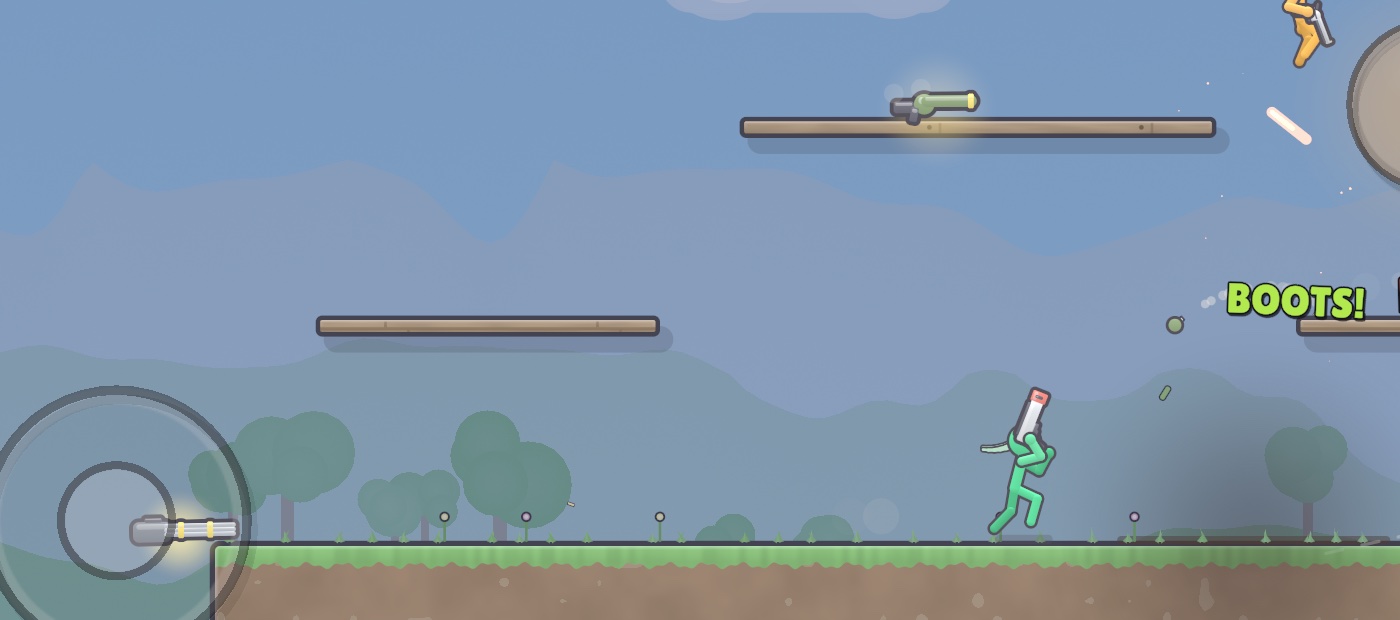
These are real frames from the current build: items are small, thin and pastel, and the buttons don't tell you what you hold.
12
In a real fight, at normal zoom
3
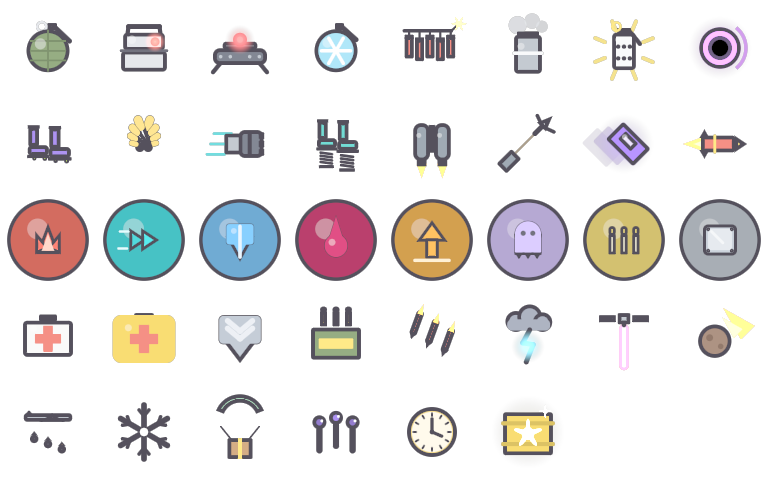
Every item icon today
456
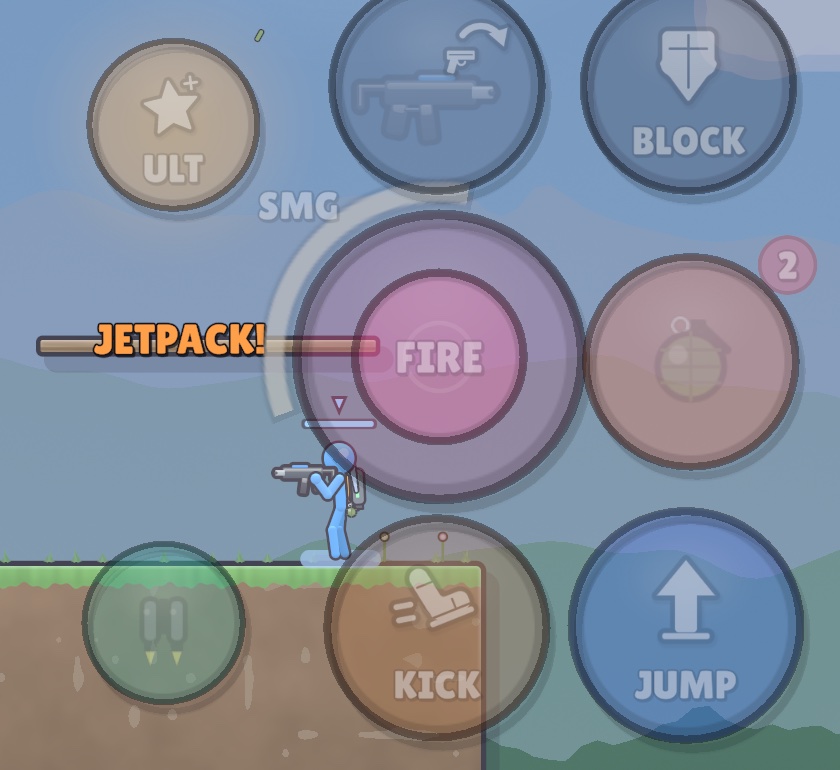
The buttons today
1A minigun smaller than a shoe, half under the move stick.
2A launcher with a faint glow. You see something, but not what it is.
3Thin lines and pastel discs with no outline. They melt into any map.
4The sky button is a generic star, not the sky power you hold.
5Gear is a tiny grey picture on a faint button.
6The frag is a faint outline on a faint button.
01 · Icon sets
Three icon sets
Each set has the same ten items: three throwables, two gear, three power-ups, a medkit and a sky power. Every category keeps one colour and one shape, so colour-blind players can still tell them apart. Each set is shown big, on the real buttons, and lying in the real arena at 1.5× today's size.
A
Spotlight stickers RECOMMENDED
Chunky die-cut stickers with an ink outline, toon shading and a white edge. They're made from the same kit as the T1 buttons, so they look like they came with PLAY!.
The set
Signature detail
UP CLOSE
On the buttons
In the arena · 1.5× today's size
DAY
FULL NIGHT
Reads at button size and at full night: the white edge always separates it from the map.
Same ink, gloss and shadow as the yellow T1 buttons.
Flat shapes, so it's cheap to draw on low-end phones.
The bold outline takes a little more room on a crowded floor.
B
Minted tokens
Every pickup is a collectible coin, and the rim tells you the type: teeth for gear, a zigzag for power-ups, scallops for health and a starburst for sky powers. On the floor they stand up and spin slowly.
The set
Signature detail
UP CLOSE
On the buttons
In the arena · 1.5× today's size
DAY
FULL NIGHT
Feels like loot, so grabbing it is satisfying.
The rim is a second code next to the colour.
A spinning coin catches the eye on the floor.
The item picture is smaller inside the coin.
Everything is round, so the arena looks less varied.
C
Night glow
Neon tubes over dark glass. Items give off their own light and light up the floor around them. Built for the new full-night default.
The set
Signature detail
UP CLOSE
On the buttons
In the arena · 1.5× today's size
DAY
FULL NIGHT
Best at full night: you find items by their light.
Sky powers and power-ups instantly look powerful.
Weaker by day: glass and neon wash out on bright maps.
Glow costs a little more to draw on low-end phones.
02 · Spawns
When an item arrives
Today an item just appears, small and faintly glowing. Each concept below plays on the real Backyard frame. All three end the same way: a name tag for 1.5 s, then a floor marker so it stays findable, plus an arrow at the screen edge when something lands off screen (big maps).
SIZE1.5×
LIGHT
Drawn with icon set A (pick another above and these redraw).
A
Supply drop
A ring marks the spot a second early. A crate parachutes in, lands with a thud and dust, and pops open to show the item.
Fair warning: everyone sees where it will land.
A big, fun moment for sky powers and gear.
Slowest: about 1.2 s before you can grab it.
A crate for every frag gets heavy, so maybe only for big items.
B
Spotlight call RECOMMENDED
A stage lamp swings in and the item rises in its light, with a yellow name sticker. After that a soft light stays on it, so it's easy to find again, even at full night.
It's the T1 Spotlight theme in the arena: the same lamp and the same yellow sticker.
Fast (0.8 s), and the light pool shows where things are at night.
Many lit items at once could stack up, so cap it at 3 lit pools.
C
Warp pop
A portal opens in the floor and the item shoots out spinning. It lands with a squash, and a comic "FRAG!" burst turns into its name tag.
The juiciest: squash and stretch, and a burst word.
Works on any floor, even moving ones.
Comic burst words fit T2 better than T1.
Busy when several items spawn at once.
03 · HUD
What you're holding
Today the buttons show a faint outline, and a generic star for the sky power. Here are three ways to make what you hold obvious, on a phone-sized frame with the icon set you picked.
A
Loaded buttons RECOMMENDED
The button shows the item. Pips on the rim count what's left, the gear's cooldown sweeps round, and the sky button shows your actual sky power. It fills with gold, then bursts READY.
On a phone
Signature detail
1The sky power, not a starA meteor fills with gold, then bursts READY.
2Count pipsThree frags, three pips on the rim. One goes out per throw.
3Power-up timerA hexagon next to HP drains round as it runs out.
The answer is right where your thumb is.
Nothing extra on screen.
The buttons change look as you pick things up. That's the point, but players will notice the change.
B
Luggage tags
The buttons stay as they are. Each one wears a small hanging tag with the item's name and its count or charge, swinging a little as you move.
On a phone
Signature detail
1Names, not just pictures"METEOR 70%" and "JETPACK" in words.
2Tags can retireThey hide after your first 10 matches. Settings brings them back.
Clearest for brand-new players.
Leaves the button art untouched.
More stuff around the cluster on small phones.
Reading words mid-fight is slower than reading a picture.
C
Loadout halo
What you hold floats in a small halo over your fighter, and a power-up timer rings your feet. Your Wi-Fi friends can see what you carry, too.
On a phone
Signature detail
1Eyes on your fighterThe halo is where you're already looking.
2Mind gamesEveryone sees your meteor is charging.
3Rage ringThe power-up timer runs round your feet.
Eyes stay on the fight.
Spectators and friends can read every loadout.
Busy with 8 fighters, so show full halos only for you, and only sky powers for others.
Small icons in the world are harder to read.
04 · Pickup
The moment you grab it
You can pick more than one here. Each plays live and is broken into four beats. A sound and a short buzz per category go with any of them.
My mix: B for every pickup, plus C for sky powers and gear, plus A only the first 3 times you meet a new item.
A
Got it! card
A big card pops up over you with the icon, the name and how to use it. Then it flies into its button.
Teaches new players what each item does.
It covers the fight for about 1 s, so show it only the first few times.
B
Snap-in RECOMMENDED
The item snaps into you, flashes and zips to its button. The button squashes and shows +3. It's all over in under a second.
Fast, and it never covers the fight.
Shows you which button uses it.
There's no name, so it relies on good icons.
C
Loot banner
For big pickups only (sky powers and gear). A ribbon drops from the top with the name and how to use it, and the sky button lights up.
Big pickups feel big.
Everyone knows you've got a sky power.
Too much for frags and medkits: they're picked up too often.